
Third Party Administration (TPA) Access
South Carolina Withholding Account
The tax agency requires we obtain and provide a Letter ID associated with your account. This Letter ID can be found on any official correspondence from the state.
When setting up Third‑Party Access, you'll need:
- The client’s valid ID number (e.g., FEIN, SSN, SID, or ITIN)
- The client’s legal or last name
- Their South Carolina Withholding File Number
- Additional details such as their last payment amount, Letter ID, or line 1 from their most recent return—or perhaps the last withholding payment made on their account.
Client letter example: 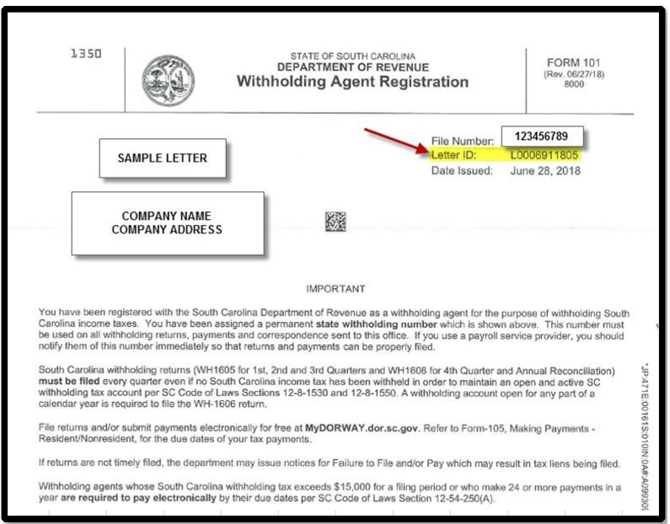
South Carolina Unemployment Account
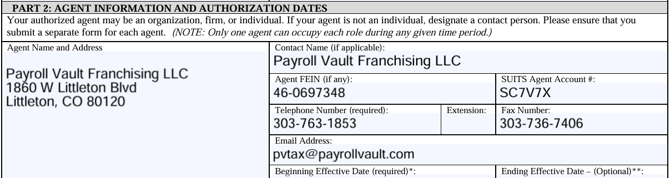
- Begin by downloading and completing the UCE-1010 Written Authorization form. Add the following details:
- Navigate to the SUITS website.
- Select the Employer portal and then select Employers under Login to my Account.
- Select the Agent Assignment icon under the Account Maintenance topic.
- Select Add Agent.
- Search for Payroll Vault Franchising's Agent Account number: SC7V7X.
- Next to Authorization Document, select Choose File.
- Browse and select the signed UCE-1010 Written Authorization form and upload the POA.
- Select the following roles:
- Payment Submission
- Wage Submission (Original and Amended)
- Account Maintenance.
- Select the date you want Payroll Vault Franchising to start processing payroll in South Carolina in the Access Begin Date field.
- Leave the Access End Date field blank.
- In South Carolina, unemployment tax (SUTA) payments that you remit on behalf of a client are processed through the state’s SCDEW (South Carolina Department of Employment and Workforce) online portal.
Here’s the key point:
- If the client is not linked to your third-party administrator (TPA) account within SCDEW, then ACH payments you submit will not be applied to that client’s account, because the system won’t recognize that you’re authorized to act on their behalf.
- The link between your payroll company and the client must be approved in the SCDEW portal. Once approved, you can file reports and make payments (including ACH).
- If you try to pay before the authorization is in place, the payment may either fail or go into an “unapplied” status until corrected.
***If the client is not linked, ACH payments won’t be properly applied.