
Setting Up a New SECURE 2.0 401(k) Plan 2025
To establish a new SECURE 2.0 401(k) plan in 2025, you need to implement automatic enrollment for eligible employees. This requires setting up an Eligible Automatic Contribution Arrangement (EACA) with a default contribution rate between 3% and 10% of compensation, and the ability to increase that rate annually by at least 1% until it reaches 10% or more (but not exceeding 15%).
Here's a more detailed breakdown:
1. Automatic Enrollment Requirement:
- New 401(k) plans must include a feature that automatically enrolls eligible employees.
- This enrollment must occur upon the employee becoming eligible, and the employee has the option to opt out of the plan.
- The initial default contribution rate must be between 3% and 10% of the employee's compensation.
- This rate is used for those who don't actively choose a different deferral rate.
- If the initial default rate is less than 10%, it must increase by at least 1% each year on the first day of the plan year.
- This escalation continues until the default rate reaches at least 10%, but no more than 15% of compensation.
- You'll need to establish a default investment option that meets QDIA requirements.
- This ensures employees have a reasonable default investment strategy if they don't actively choose one.
- You must provide notice to employees about the plan, including contribution rates, opt-out instructions, and investment options.
- There are some exemptions to the automatic enrollment requirement, such as for small businesses with 10 or fewer employees, new businesses (those in existence for less than three years), and church plans.
- If you fall under an exemption, you don't have to implement automatic enrollment.
Information to convey and questions to ask your client
1. Secure 2.0 requires auto-enrollment unless you are exempt.-
- Do you have more than 11 employees?
- Have you been in business longer than 3 years?
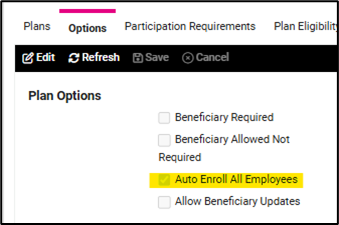
2. Employees will have a default contribution rate that must be between 3% and 10%
-
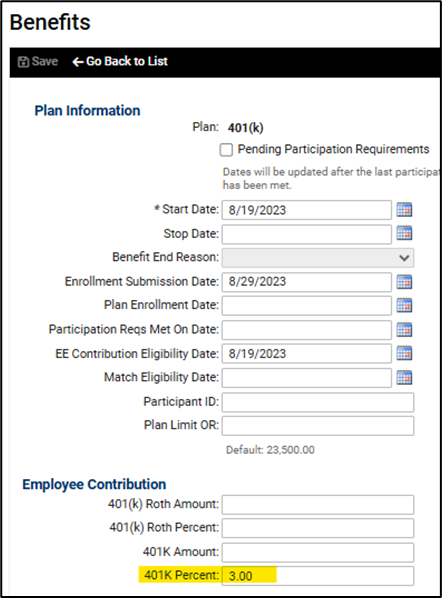
- What will your default contribution rate be
- ***If the default contribution rate is less than 10%, the rate must increase on the first day of the plan year by 1% until the default rate reaches a minimum of 10%
- Rates are entered on the deferred comp tab under Benefits
4. Clients must provide notification to employees that includes information on the following
-
- The type of plan
- The default contribution rate
- How to opt out of the plan
- How to change the contribution rate/amount
- The default investment strategy and other options available
**** You can help your client get this information out to their client’s employees by using the mass email utility and/or employee messages
5. Lastly, please convey the following to your client about your role in their 401(k) plan
Subject: Important Reminder Regarding Retirement Plan Contributions
Dear [Client Name],
As part of our payroll services, we are happy to assist with calculating and preparing the files needed for your retirement plan contributions. We strive to make this process as simple and accurate as possible for you.
We kindly remind you that:
- It remains your responsibility to review all retirement plan records to ensure employee wages and contribution amounts are accurate.
- You are responsible for continually validating the funding of contributions from your bank account.
- While we provide the necessary reports and files, Payroll Vault is not responsible for verifying final contributions or ensuring the completion of funding.
Should something need correction, please notify our office immediately.
- We recommend reviewing your reports regularly to help ensure everything remains accurate and on schedule.
As always, if you have any questions or would like additional support in reviewing your records, we are here to help.
Thank you for the opportunity to support your business.
Sincerely,
[Franchisee Name]
Setting up isolved
Navigate to Client Management > Benefits > Benefit Types
- Add New
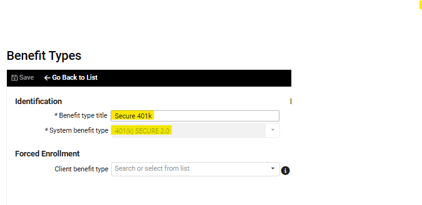
Navigate to Client Management > Payroll > Deductions
- Add New
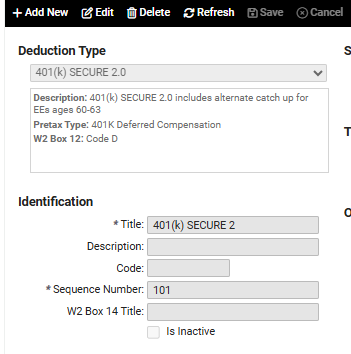
- Add 3 types: 401(k) SECURE 2.0, 401(k) Roth SECURE 2.0, and 401(k) Loan SECURE 2.0
Navigate to Client Management > Benefits > Deferred Comp
- Set up the deferred comp using the SECURE benefit type
If previous EE contributions need to be moved to the new plan, create a current quarter adjustment payroll run and move YTD amounts to the SECURE deduction.