
Human Interest isolved Setup
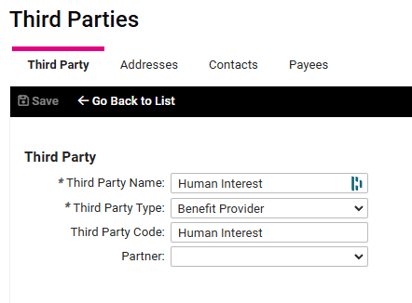
- Setup Third Party
- Navigate to Client Management > Payroll > Third Parties
- Click Add New
- Third Party Name: Human Interest
- Third Party Type: Benefits Provider
- Third Party Code: Human Interest
- The next following page do not need information - Addresses, Contact, and Payment Information. You can click Next until the option to Save is available.
- Add/Update Deferred Comp Plan
- Navigate to Client Management > Benefits > Deferred Comp
- Plans tab - Note: If plan is not setup, create plan according to Human Interest plan rules
- Click Edit
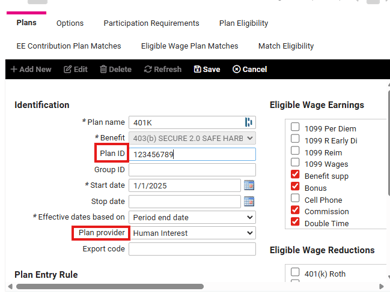
- Plan ID: provided by Human Interest
- Plan Provider: Human Interest
- Click Edit
- Click on the Options tab
- Click Edit
- Check mark 'Auto Enroll All Employees'
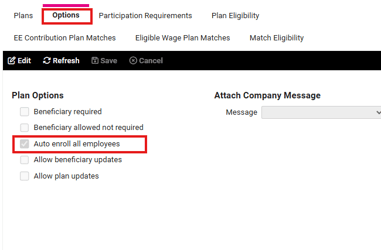
- Check mark 'Auto Enroll All Employees'
- Click Save
- Click Edit
- Be sure all other tabs on the Deferred Comp screen are setup according to Human Interest plan rules
- Add Client to Partner User
- Navigate to Security > Partner Users
- On the right hand side search for Human Interest
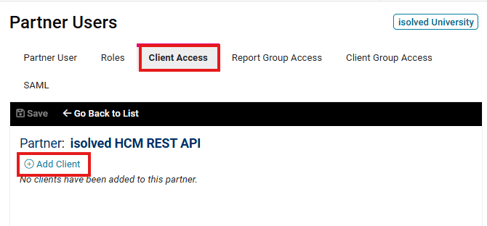
- The Partner name should be isolved HCM REST API
- Click on the pencil icon and choose the Client Access tab
- Add Client and enter client code
- Click Save
- Add Client and enter client code
- Refresh the system date
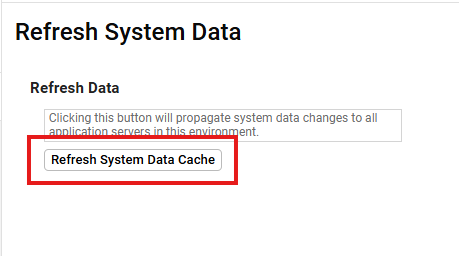
- Go to Utilities > Refresh System Data
- Click Refresh System Data Cache
From Human Interest: Human Interest Payroll Connection Guide: isolved