
- Reporting> Client Reports
-
-
Type FTE in Search
- Click Filter
- In the FTE by Hours Paid Report description, copy the Custom Accumulator name CPPP_HRS.
- *Make sure to copy since the naming convention must be exact.
-
- Client Management> Payroll> Accumulators
-
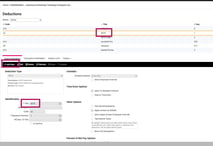
- Add New
- Accumulator Type will default to Custom
- Paste the copied name CPPP_HRS for Accumulator Title and Accumulator Code.
- Check the “Allow Earnings” Box
- Make sure all the Hourly Earnings you want included are checked off.
- Click Save.
-
This report will now run based on this new accumulator you created.