One Big Beautiful Bill Act (OB3) – Overtime Premium Reporting
Resources
One Big Beautiful Bill Act (OB3) – Overtime Premium Reporting: What You Need to Know
How Do I Change the FLSA OT Premium Amount That Has Been Reported So Far This Year?
Client Setup Instructions
1. Update Time Entry Options
Navigate to: Payroll Processing → Payroll Entry Setup → Time Entry Options
Update the following settings:
- Average Overtime Weeks
- Leave blank for Weekly
- 2 = Bi-Weekly
- 3 = Semi-Monthly
- 5 = Monthly
- For Semi-Monthly and Monthly payrolls, check the box:
“Blended Overtime Based on Work Week.”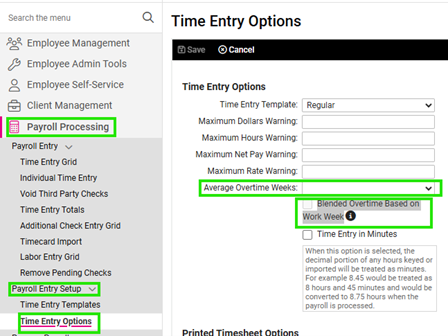
2. Verify Memo Calculation SetupConfirm the FLSA OT PREM memo calculation is configured correctly.
- Ensure “Block Display on Reports” is unchecked.
- The sequence number for the FLSA OT PREM memo calc must be higher than any earning that should be included in the calculation.
- Any earnings that should not be included must have a sequence number above the FLSA OT PREM memo calc.
3. Verify After the First Payroll Run
After the first payroll is processed:
-
Select an employee with FLSA OT PREM on their payroll.
-
Confirm the calculation is correct.
Calculation Method
-
Identify hours worked over 40.
-
Multiply overtime hours by 1/3 of the overtime rate.
Important:
FLSA OT PREM represents the 0.5 portion of the 1.5 overtime rate.Example
Employee: Joe
Rate: $15/hr
Hours Worked: 45Pay Type
Calculation
Amount
Regular Pay
40 × $15
$600
Overtime Pay
5 × $22.50
$112.50
FLSA OT PREM
($22.50 ÷ 3) × 5
$37.50
If the FLSA OT PREM calculation is incorrect:
-
Review Hours Worked accumulators
-
Review Regular Earnings accumulators
-
Ensure the correct earnings are included in the calculation.
If further adjustments are needed, submit a ticket to OPS.
-
If FLSA OT PREM Calculates on an Exempt Employee
If the FLSA OT PREM memo calculation appears for an exempt employee, follow these steps:
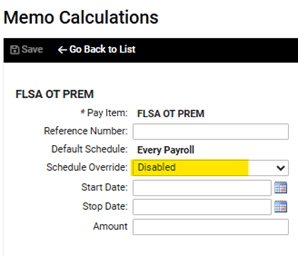
Navigate to: Employee Management → Employee Pay → Memo Calculations
- Change the Schedule Override to Disabled.
Important Notes
- If an employee does not have an overtime earning on the check, the FLSA OT PREM memo will be $0.
- This applies to both salaried and hourly employees.
- The update ensures only employees with overtime earnings receive the FLSA overtime premium calculation.
- Effective: March 6, 2026
- This change will not retroactively adjust previously run payrolls.
Adjustments for Prior Payrolls
To adjust previously reported amounts:
How Do I Change the FLSA OT Premium Amount That Has Been Reported So Far This Year?
https://learning.myisolved.com/library/articles/6819Additionally:
- The “OT and Tips – Employer 2026 Recalc” report will be released March 20, 2026 to assist with prior payroll adjustments.
Client Responsibilities
Time Clients
No additional action is required.
Time Entry Clients
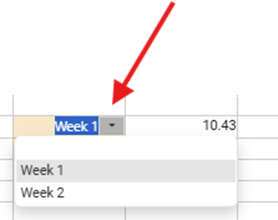
Clients must report all hours by week using the Time Entry Grid.
Example:
- Week 1 → First line
- Week 2 → Second line
- Week 3 → Third line
To additional lines:
- Press CTRL + ENTER
- (Mac users may require a different shortcut depending on keyboard settings.)
Once hours are entered by week, processing continues as normal.