
Fidelity Direct Deposit Setup Instructions
To setup Fidelity S-IRA EE and ER contributions to be direct deposited with payroll see the steps below.
1. Add A Third Party for both EE Fidelity Investments & ER Fidelity Investments
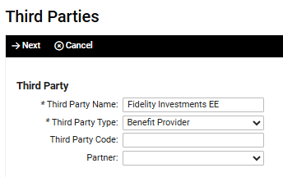
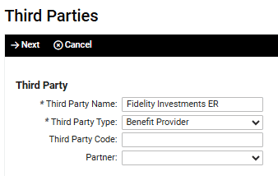
- No address or contact needed for the payee
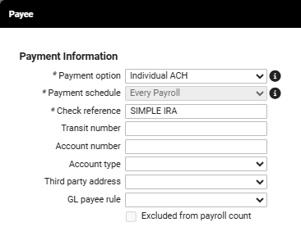
- Under Payment Option, select “Individual ACH” if the Transit Number is the same across all employees with the provider. Account Number is blank, since each employee has their own unique account number. Fidelity Routing # is 101205681
- Under Payment Option, select “Individual ACH Employee Bank” if the Transit Number and Account Number is unique to each employee.
- Check reference can be "Simple IRA"
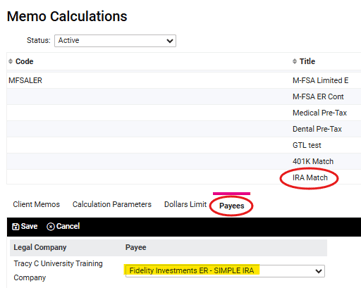
2. Navigate to Memo Calculations at the client level. Add ER Payee to your Memo for the SIMPLE IRA Match.
3. Navigate to Deductions at the client level. Add EE Payee to your Deduction for the SIMPLE IRA
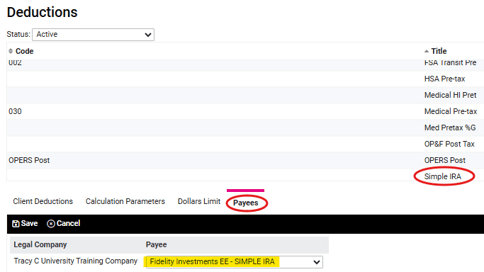
4. The bank information (account and/or routing numbers) will need to be entered on both the IRA Match under Memo Calculations and the IRA Deduction under Deductions at the Employee Level.
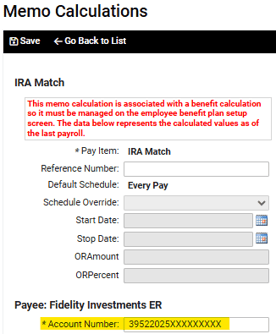
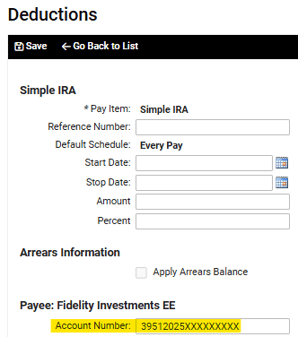
- Fidelity Account # should be 10 digits and follows the ↑prefix 39522025 for the memo calc (2 identifies that it is ER contribution, 2025 identifies the year) and 39512025 for the deduction 39512025 (1 identifies that it is EE contribution, 2025 identifies the year.) The year will need to be updated before the first payroll of every year.
5. Once this is set up, confirm on the direct deposit report (sheet 2) that EE has both EE and ER accounts set up. No other action needed with each payroll.
6. KEY ALERT!!! After Final payroll of the year, update the Year in both Memo and Deduction account numbers for all EE’s