
Overview:
Celayix offers an employee scheduling, time & attendance solution for the security, healthcare, and hospitality industries. Often, clients using their system have employees working in different locations, jobs and at different pay rates per location/job. This integration was piloted with a Network Partner client and became available in Q1 of 2023.
This integration uses the REST API to import new employees and employee updates into the Celayix system and a client-initiated Post of finalized payroll hours from Celayix into isolved. Celayix also utilizes the isolved Employee Data Beacon to receive alerts on employee changes so they can import updated information as needed.
Endpoints used in this integration:
- /api/clients
- /api/clients/?includeDetails=True
- /api/clients//legals?includeDetails=True
- /api/clients//legals/?includeDetails=True
- /api/clients//legals//employeesWithSSN/?includeOrganizations=True
- /api/clients//importTypes
- /api/clients//imports
- /api/clients//imports/
- /api/clients//imports//commit
- /api/system/states
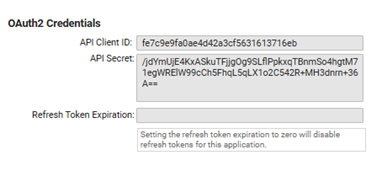
API Client ID: fe7c9e9fa0ae4d42a3cf5631613716eb
API Secret Key: /jdYmUjE4KxASkuTFjjgOg9SLflPpkxqTBnmSo4hgtM71egWRElW99cCh5FhqL5qLX1o2C542R+MH3dnrn+36A==
Celayix Pre Setup Information:
Send the following information to the Celayix Project Contact. If you have not been assigned a project contact yet, email support@celayix.com.
- Isolved environment URL
- Isolved Client Number and Name
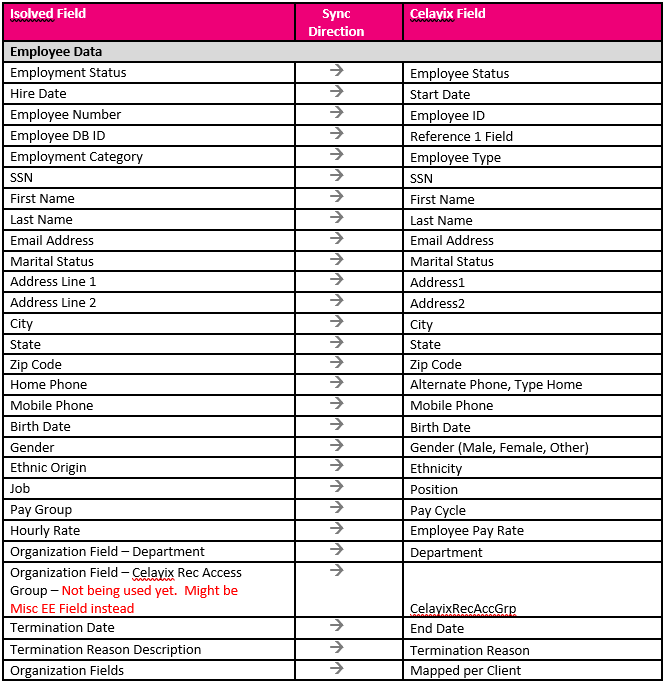
- Employee Demographic export for initial load of employee data into Celayix – Build export with the fields on the next page and send to Celayix contact
- Currently Celayix is handling this directly with the client. At some point they might provide us with a standard Employee Import file to setup and export from isolved for this one-time load.
Request the following information from Celayix
- Data Beacon URL for this client
Employee Fields Exchanged:
Celayix isolved Setup:
Add Client to the Partner User
- Navigate to: SecurityàPartner Users
- Type ‘Celayix’ into the Search field
- Click the Pencil icon to Edit
- Client Access Tab
- Add New
- Client Code: Enter client ID for client requesting the integration
- Click Save
Setup the Employee Data Beacon
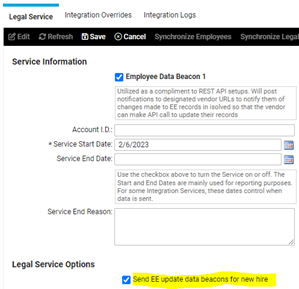
The standard data beacon configuration has been changed to remove duplicate alerts for new hires. However, Celayix has developed their integration to act only on ’Employee’ alerts which are no longer sent automatically for a new hire. However, there is an option to turn on the ‘Employee’ alerts to accommodate this requirement.
- Navigate to: Client ManagementàClient MaintenanceàLegal Services
- Search for Employee Data Beacon 1
- Click Edit and Click the Checkbox to Enable it
- Set the Service Start Date Two Weeks Back
- Under Legal Service Options, check ‘Send EE update data beacons for new hire’
- Click Save
- Search for Employee Data Beacon 1 again and select
- Click the Integration Overrides Tab
- Enter the URL provided by Celayix
- Enter the following information:
- URL - provided by Celayix
- Username: isolved
- Password: b*lbD482a*NB
- Click Save
Setup Complete Notification
- E-mail the Celayix project contact or support@celayix.com and the client to notify them that the isolved portion of the setup is complete and Celayix can now complete their setup
Vendor Setup and Onboarding
- E-mail Celayix and the client to check the status of the integration and proposed go live date
- Celayix trains the client how to use Celayix.