
The purpose of this article is to create a master spreadsheet of clients that have entered new state IDs (EIN) into iSolved. We will need to gather TPA access based on this master spreadsheet.
- Login to iSolved
- Navigate to Production Utilities > Client Change Log-All Clients
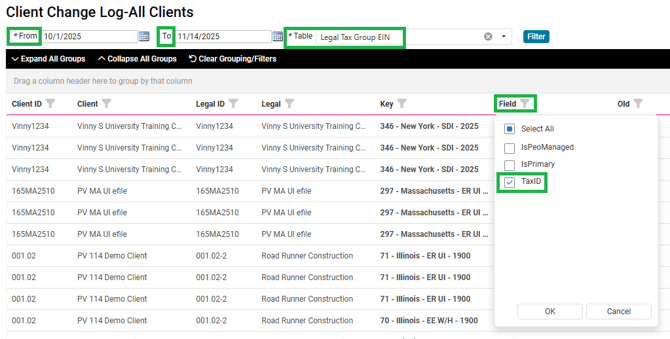
- Filter
- From Date: First day of quarter
- To Date: The day prior to when you are pulling the report
- Table: Legal Tax Group EIN
- Select Filter
- Under the Field filter, filter for Tax ID
- Select the icon to Export all data to Excel

- Once the Excel is exported highlight column A and select Insert
- Name Column A: Security Group
- Enter the Security Group ID (example: COLI-100)
- Repeat all steps for all of your Security Groups and send them to Jolinda by email to create a Master Spreadsheet
Note: This report should be pulled by the 15th of each month and bi-weekly in the last month of the quarter.