
1. What Amendments Are
Amendments refer to corrections made to previously filed federal and state payroll tax forms. These include:
Federal Amendments
- Form 941-X – Adjusted Employer’s Quarterly Federal Tax Return
- Form 940 Amended – Corrected Annual Federal Unemployment Tax Return
State & Local Amendments
- All state unemployment, withholding, and local tax returns or wage reports that require correction
A. Ticket Intake (OPS → Tax Team)
- OPS identifies an amendment need, works with the franchise to process prior quarter adjustments, and transfers tickets to the Tax team.
- OPS makes a note on the Tax Amendments Team Checklist.
- The assigned Tax Specialist processes the amendments in iSolved and responses to the franchise once completed.
- Tax Specialist completed Tax Amendment checklist
- Bills the franchise (Using the Franchising Billing Spreadsheet) The assigned Tax Specialist processes the amendments in iSolved and responses to the franchise once completed.
- Go to Tax Quarter End| Quarter End Approval → Under Return Type Select - Amendments.
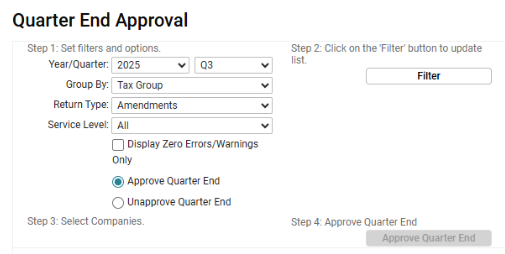
- Approve Quarter End| Then Create Tax E-File or Print Tax Forms
- Verify returns are accurate. iSolved sometime generate 0.00 amendments – these do not need to be sent.
- E-File the amendments based on the state or mail the amendments if paper copies are generated.
Tax Amendments Team Checklist Instructions
The checklist contains 11 Columns:
- To Be Completed
The first 6 columns are completed by OPS
Action Required:
- Column G indicates the forms requiring amendment based on the PQA.
- Columns H is the NOTES column – indicate how forms were completed i.e. 941-X mailed, RITA 11A -E-filed.
- Column I is the Billing. Indicate the amount to be billed and enter this in the Franchising Billing spreadsheet for the Banking team to bill the franchise
- Column J is to check that the notes have been entered into HubSpot to notify the franchise that the returns have been completed and are available for their clients.
- Column K is for the date completed
