
This Standard Operating Procedure (SOP) outlines the process of reviewing pending payment due dates to ensure all payments have been paid timely. This report will be processed every Tuesday and Thursday.
- Login to iSolved
- Select the Security Group
- Navigate to Production Utilities > Service Bureau Reports
- Select the report named Tax Payment Analysis
- Filter
- Date Range Type: Due Date
- Range Begin: Beginning of Year
- Range End: Next day of current day
- Tuesday you will pull until Wednesday
- Thursday you will pull until Friday
- Payment Status: Check mark pending and held status
- EIN Type: Registered
- Format: Excel
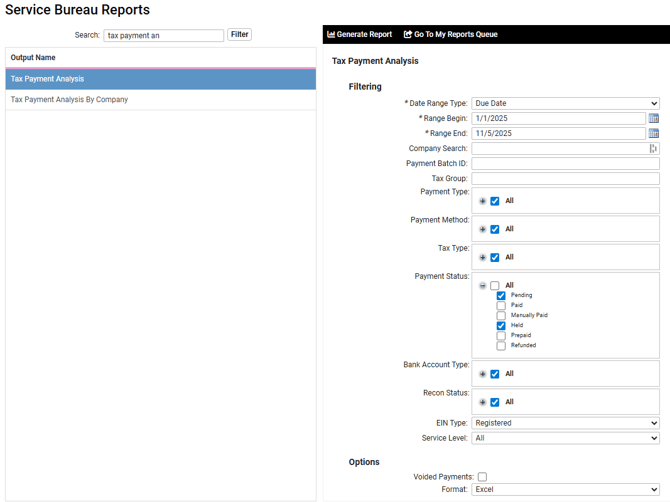
- Select Generate Report
- Select Go To My Reports Queue
- View Report
- Put a filter on the headers
- Filter the date to see what has been paid and what needs to be paid
- Add a column to enter any notes on spreadsheet
- Add spreadsheet to Sharepoint under +Printing Payment Review
- Reach out to tax processor to notify them of what needs to be paid
- Jolinda to review for Tyler
- Tendai to review for Troy and Sara
- Troy to review for Ashley
- Ashley to review for Jolinda
- Tyler to review for Tendai
Helpful notes:
- All tax payments should be paid out of iSolved two business days prior to the due date via ACH NACHA file rules
- Federal tax payments should be paid on Monday and Wednesdays
- Federal tax payments over $100K are paid the next day from the pay date