
Missouri UI
Missouri UI site - Agency Site
In the blue ribbon on the top left, click on Contribution and Wage Report File Contribution and Wage Report (need to file individually, not set up for a bulk upload yet)
Enter Account UI # (if the POA is on file, the account will be tied to our account) *If no account appears, then we do not have access granted and will need to be mailed.*
Review the Information Submitted By with PV's info that's correct, and click next. Verify Address Details, and Click Next
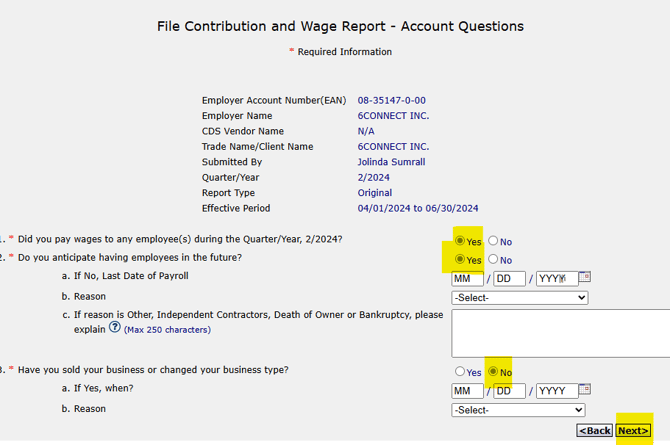
Select the following answers on the next screen to continue filing the report:
Enter the Amount of EE for each month through the quarter, and click next
*Use Method B as the default to use the upload file from Isolved.
Method A is a manual entry of the wage report
Select the bulk upload file and submit. Save the confirmation # to the master spreadsheet & iSolved.
Missouri Locals
Missouri - Kansas City - Agency Site
Under summary > click Submit RD110s
Select Upload RD-110s (XML) > upload your file from Isolved
Save your confirmation in Isolved, Master spreadsheet, and Save confirmation page
Missouri - Saint Louis
Mailed