Skip to content
English
  • There are no suggestions because the search field is empty.

Kansas

Kansas Unemployment 

  • Login to the account  
  • Select the following option: 

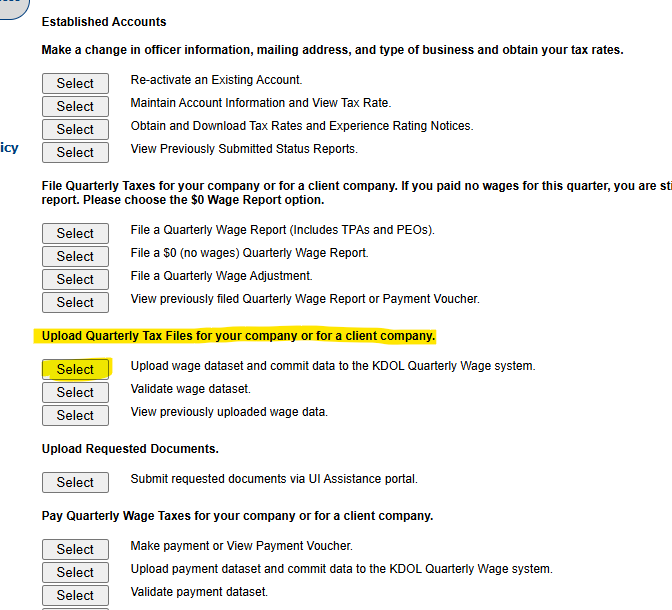
Established Accounts 
Make a change in officer information, mailing address, and type of business and obtain your tax rates. 
Select 
Select 
Select 
Select 
Re-activate an Existing Account. 
Maintain Account Information and View Tax Rate. 
Obtain and Download Tax Rates and Experience Rating Notices. 
View Previousty Submitted Status Reports 
File Quarterly Taxes for your company or for a client company. If you paid no wages for this quarter, you are 
report. Please choose the SO Wage Report option. 
Select 
Select 
Select 
File a Quarterly Wage Report (Includes TPAs and PEOsl 
File a SO (no wages) Quarterty Wage Report 
File a Quarterly Wage Adjustment 
View previously filed Quarterly Wage Report or Payment Voucher 
pload Quarterly Tax Files for your company or for a client company. 
Select 
Select 
Select 
Upload wage dataset and commit data to the KOOL Quarterty Wage system. 
Validate wage dataset 
View previously uploaded wage data. 
Upload Requested Documents. 
Select 
Submit requested documents via UI Assistance portal 
Pay Quarterly Wage Taxes for your company or for a client company. 
Select 
Select 
Make payment or View Payment Voucher 
Upload payment dataset and commit data to the KDOL Quarterly Wage systenm 
Validate payment dataset

  • Select this option: Upload a NASWA format Wage Detail File. 
  • Upload Isolved File, and Save Confirmations to iSolved & Quarterly Confirmation Folder 
  • Payments go ACH Credit 


Kansas Withholding 

  • KS Withholding- Mail 
  • Needs to setup e-file for W2 submission