Skip to content
English
  • There are no suggestions because the search field is empty.

Illinois

Illinois Unemployment 

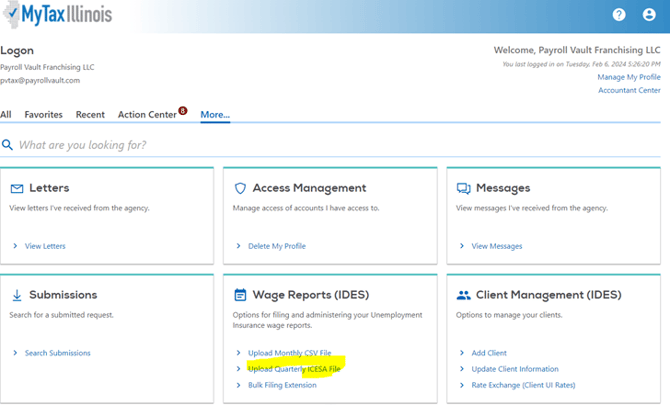
  • Create E-file in iSolved and under Payroll Vault – click Upload quarterly ICESA file 
Illinois Withholding 

IL WH transmits directly from iSolved to IL. You do not need access to the client to file in Illinois. 

Reminder, when doing the IL 941’s, you’ll need the below application to download the acknowledgment to upload into isolved to see which returns were accepted and rejected and the reason.   

In iSolved the file will appear to have gone through as successful. You will then need to check the file through an additional app and you can check your file immediately after to make sure there were no errors.    

 To check the files:   

(Hold down ctrl and hover over the address to be able to go there from this sheet)  

https://www.revenue.state.il.us/ecs/HttpsPost.exe.   

Login ID: 37728          

Production password: PIJLAG  

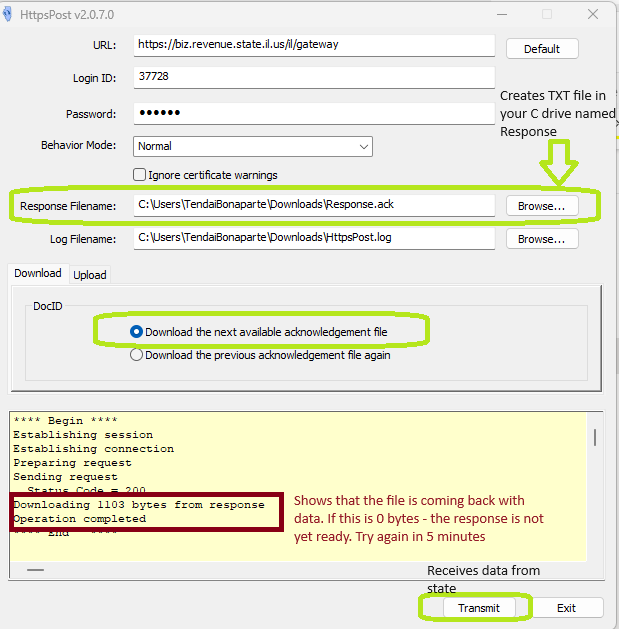
  • Make sure the option Download tab the option is set to Download the next available Acknowledgement File  
  • Select Transmit  
  • The agency will show the file by the data in the yellow screen – (see screenshot ) 
  • Click on the option: Repose Filename and Browse – this creates a Response txt file to your path indicated (mine is the C drive in my Download)HttpsPost v2.O.7.O 
URL : 
Login ID: 
Password: 
Behavior Mode: 
Response Filename: 
Log Filename: 
Download upload 
https://biz.revenue state usfll/gatevvay 
37728 
Normal 
Ignore certificate warnings 
C : User siTenda80naparte DownIoadsBesponse ack 
C : user siTenda80napar te Dovvnloads\httpspost.log 
O Download the next available acknowledgement fie 
Download the previous acknowledgement file again 
Default 
Creates TXT file in 
your C drive name 
Response 
arovvse... 
arovvse 
Establishing session 
s t ing 
P æp a ing 
Sending request 
1108 bytes 
Shows that the file is coming back with 
data. If this is O bytes - the response is not 
yet ready. Try again in 5 minutes 
Receives data from 
Transmit
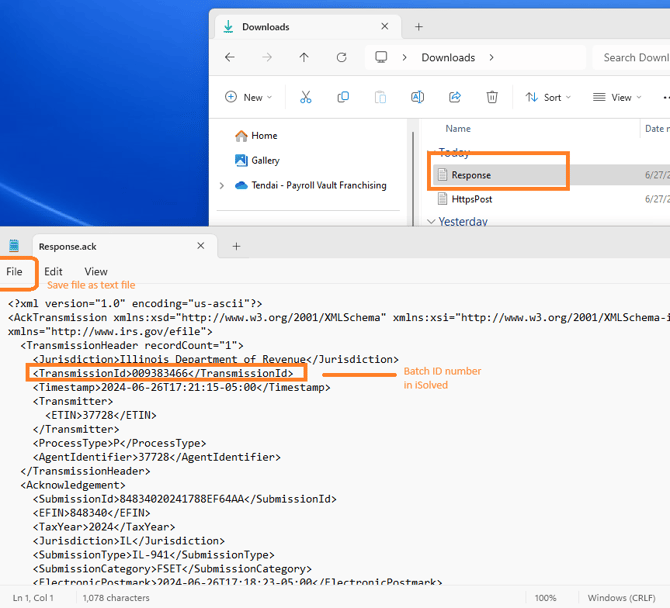
  • On your C Drive open the Response file and verify your Batch number in iSolved to the Transmisson ID to make sure it is the correct ack file. Save file as txt file. 
  • Upload in iSolved. 
    Downloads 
New 
Gallery 
Tendai- Payroll Vault Franchising 
Downloads 
Name 
HttpsPost 
•v yesterdav 
Sort 
Search Downl 
Date r 
6/27Æ 
6/27Æ 
File 
Response.ack 
Edit View 
Save file as text file 
encoding="us-ascii"?> 
<AckTransmission xmlns:xsd="http://LWN.w3.org/2ØØ1/XMLSchema" xmlns:xsi="http://M.m.w3.org/2ØØ1/XMLSchema-J 
xmlns="http://l.rv.•v' irs . 
< TransmissionHeader recordCount="1"> 
< Transmissionld> 
: 21 : 15-05 : 
< Transmitter) 
</Transmitter> 
<ProcessType>P</ProcessType> 
/ Agentldentifier> 
</TransmissionHeader> 
(Acknowledgement) 
(Submission 
Ln 1, col 1 
1,078 characters 
Batch ID number 
in iSoIved 
100% 
windows (CRLF)