
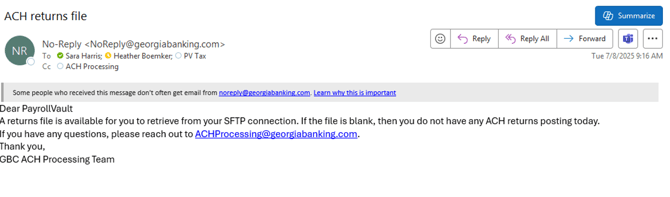
- Georgia Bank sends an email stating there is an ACH Return in the file
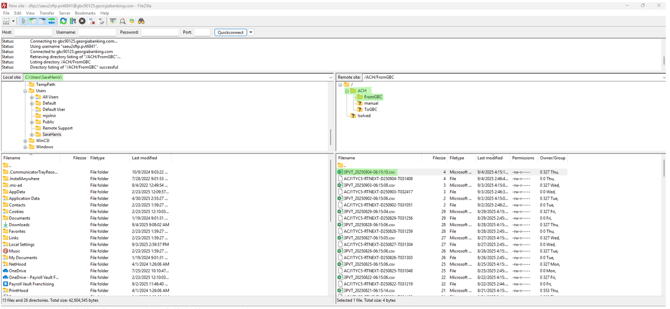
- Login to FileZilla
- Select the ACH File > FromGBC
- In the bottom right corner select and double click the file return from today. This will open on a csv format. The top left corner of FileZilla will show the path/location to where the file is being downloaded.
-
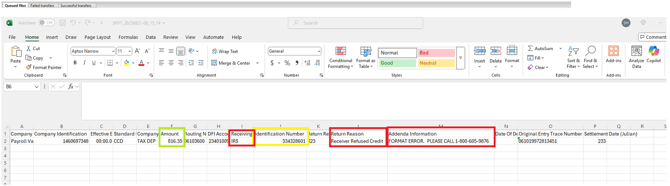
Open the .csv file on your computer
- The yellow highlighted is the client FEIN number – Check this in iSolved PRIME to see who the client is
- The green is the return amount
- These returns are from the IRS – Check the EFTPS batch provider to see if there was an error
- Print a copy to Littleton - Bank Returns Georgia - All Documents
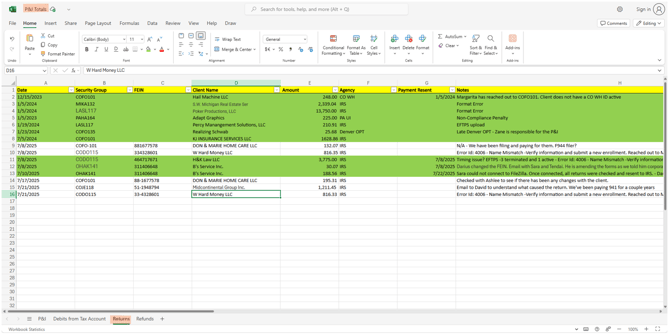
- Enter the return on the bank rec P&I spreadsheet for tracking purposes
- In Teams > Chats > Bank Rec Chats > Shared > P&I Totals.xlsx > Returns tab
- Check in the EFTPS batch provider to see if there was a rejection to the client in the EFTPS batch provider registration.
- Send an email to the franchise letting them know of the return and return reason.
- If unsure of the reason you can also ask the franchise if there has been a change to the client FEIN and/or legal business name as it is with the IRS. Have them check with their client to verify.
- Ask for an SS4
- Once okay, if needed, resubmit the EFTPS registration and resubmit the payment through the Client Management > Taxes > Tax Adjustment Screen.
- $30.07 was the FUTA payment. This was verified on the Service Bureau Report > Tax Payment Analysis Report
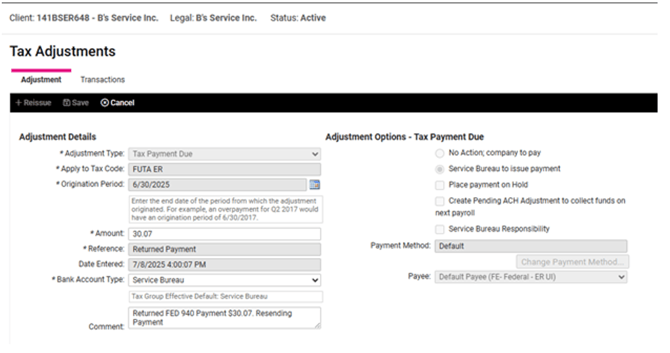
- Push out payment from the Tax Filing Management > Tax Payment Processing > Process Payments screen filtered to Adjustment Payment Process